Taking medicines on time is not just important — it’s life-saving. But let’s be honest: typing reminders into a phone or setting up complex apps can feel like a chore, especially for seniors who don’t want another “tech headache.” Enter the game-changer: camera-based medication scheduling.
This simple yet smart system helps seniors manage their pills with almost no typing, no complicated setups, and zero stress. Let’s break it down in a fun, friendly way.
Why Traditional Medication Reminders Fail
Most seniors rely on:
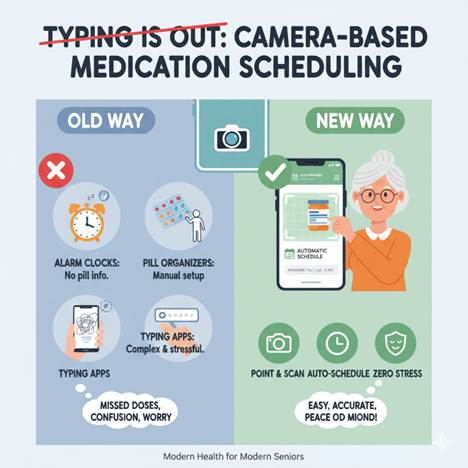
Alarm clocks – They beep, but they don’t tell which pill to take.
Pill organizers – Helpful, but someone still has to set them up correctly.
Typing-based apps – Too many steps, passwords, and confusing menus.
The result? Missed doses, double doses, and unnecessary worry.
The Modern Twist: Camera-Based Scheduling
Imagine this: instead of typing every detail, you just hold your pill bottle up to your phone’s camera. The app scans the label, reads the prescription, and automatically creates a schedule.
No typing. No confusion. Just point, snap, and done.
Key Benefits of Camera-Based Medication Scheduling
Typing-free convenience – Ideal for seniors who aren’t comfortable with smartphones.
Visual reminders – Some apps show pill images, making it easier to identify the right medicine.
Caregiver sync – Family or caregivers can also receive alerts.
Voice and camera integration – Seniors can confirm intake by showing the pill to the camera.
How It Works: Step-by-Step
Scan the bottle → The app extracts medicine name, dosage, and timing.
Schedule auto-sets → The app builds reminders based on prescription info.
Get reminders → Alerts with pill names, images, and instructions.
Track intake → Seniors can tap “taken” or show the pill via camera for confirmation.
Caregiver notifications → Family gets a ping if a dose is missed.
Comparison at a Glance
Feature
Traditional Apps (Typing)
Camera-Based Scheduling
Setup time
Long (manual entry)
Quick (snap and go)
Ease of use
Confusing for many
Very simple
Error risk
High (typos, wrong dose)
Low (automated scan)
Visual confirmation
Rare
Common
Caregiver involvement
Limited
Built-in sharing
Senior-friendly
Moderate
Excellent
Real-Life Impact: Stories that Inspire
Mrs. Rao, 72: “I used to forget my evening pill. Now my phone just shows me the pill picture at 7 pm. I can’t miss it!”
Mr. Mehta, 80: “Typing on my phone was impossible. Scanning is so easy — I feel more independent.”
Why Seniors Love It
No tiny buttons to press
Less reliance on memory
More confidence in medication safety
Peace of mind for both seniors and caregivers
Future of Medication Management
With AI-powered scanning, voice assistants, and smart pillboxes, camera-based scheduling is only getting better. Soon, seniors may simply show the camera their pills once a week and let the system take care of the rest.
Medication should heal, not hassle. With camera-based medication scheduling, seniors can say goodbye to typing struggles and hello to a safer, stress-free routine. It’s simple, smart, and designed with seniors in mind.
For today’s modern senior, the camera isn’t just for selfies — it’s for health and independence.
Healthy aging is not simply about living longer. It is about maintaining independence, staying active, managing everyday health needs, and remaining connected with the people who matter.
Technology is increasingly supporting these goals. From mobile apps and smartwatches to medical alert wearables and connected health devices, today’s Healthy Aging Tools can make everyday routines easier for seniors and their caregivers.
The goal is not to fill a senior’s life with complicated technology. The most useful solutions are simple, practical, and designed to support independence while providing an additional layer of safety.
Why Technology Has Become Part of Healthy Aging
As daily health needs change with age, small tasks can become increasingly important. Remembering medications, monitoring health information, maintaining physical activity, and knowing how to reach help are all part of living independently.
Modern senior care technology can support these everyday activities.
Instead of depending on separate notebooks, reminders, and frequent family calls, digital tools can organize information and create easier ways for seniors and caregivers to stay connected.
Technology works best when it complements human care rather than trying to replace it.
Mobile Apps Put Everyday Support in One Place
A senior-focused mobile app can act as a central hub for everyday care.
Depending on the platform, seniors may be able to organize medications, record health information, receive reminders, complete wellness check-ins, and communicate important updates with caregivers.
For family members, a senior care app can provide additional reassurance without requiring repeated phone calls throughout the day.
The biggest advantage is convenience. Instead of managing multiple systems, important care activities can be brought together in one accessible place.
For seniors, however, usability matters. Large buttons, clear navigation, simple dashboards, and minimal setup can make the difference between technology being genuinely useful and eventually being abandoned.
Wearables Support Safety Without Limiting Independence
Wearable technology is another important category of Healthy Aging Tools.
Smartwatches and safety wearables can provide useful capabilities while seniors continue normal activities such as walking, gardening, shopping, or spending time with friends.
Depending on the device, features may include activity tracking, heart-rate information, GPS capabilities, fall detection, and emergency assistance.
A wearable can be particularly helpful when a senior lives independently because important safety features remain accessible without requiring them to stay close to a phone.
Comfort is equally important. A safety device only provides value when the older adult is willing to wear it consistently.
Medical Alert Technology Creates Faster Access to Help
For seniors aging at home, having a reliable way to request assistance can provide an additional layer of protection.
Personal emergency response systems and medical alert devices are designed around this need. Depending on the solution, a senior may be able to activate an emergency button or use automatic safety features when assistance is required.
Some wearable solutions can also support fall detection. However, automatic fall detection should complement rather than replace an accessible way to manually request help.
For families, these aging in place technologies can provide reassurance while allowing an older loved one to maintain greater independence.
Connected Health Devices Make Monitoring More Convenient
Healthy aging also involves understanding changes in everyday health.
Connected devices can make it easier to monitor information such as blood pressure, pulse rate, blood glucose, oxygen levels, weight, or other relevant measurements.
Rather than recording every result manually, compatible remote health monitoring tools can help organize information digitally.
This can make health records easier to review and share when appropriate.
Technology does not replace professional medical advice or diagnosis. Its role is to make routine health information more accessible and easier to manage as part of an established care plan.
mySeniorCareHub Brings Healthy Aging Tools Together
One challenge families face is using separate products for different senior care needs.
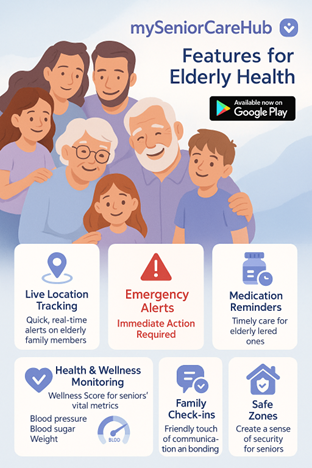
mySeniorCareHub brings multiple connected-care capabilities into one ecosystem, including a mobile app, safety wearables, personal emergency response solutions, health monitoring tools, medication support, and caregiver connectivity.
Rather than focusing on technology for its own sake, the platform is designed around practical everyday needs: staying safer, keeping health information organized, maintaining routines, and helping families remain connected.
For seniors, this supports greater independence. For caregivers, connected tools can provide useful information and reassurance even when they cannot be physically present.
Choose Technology That Makes Life Simpler
More technology does not automatically mean better care.
When comparing Healthy Aging Tools, families should prioritize simplicity, reliability, comfort, accessibility, and relevance to the senior’s actual lifestyle.
A smartwatch may suit an active older adult, while someone primarily aging at home may benefit more from an emergency response solution. Others may gain the most value from medication support or connected health monitoring.
The right combination should reduce complexity, not create more of it.
Ultimately, apps, wearables, and smart tools are most valuable when they help older adults do what technology should support in the first place: live with greater independence, confidence, connection, and dignity.
Healthcare is rapidly shifting from clinics to homes, with technology playing the biggest role in this transition. One of the newest innovations making waves is the voice-powered AI symptom checker. mySeniorcareHub has recently introduced this feature, allowing users to simply speak their symptoms into the app and receive instant insights on possible health conditions.
This isn’t just a cool tool it’s a game changer in how we approach healthcare at home, especially for seniors and caregivers. Let’s explore how this feature works, why it matters, and how it empowers you to take better care of your health.
What Is a Voice AI Symptom Checker?
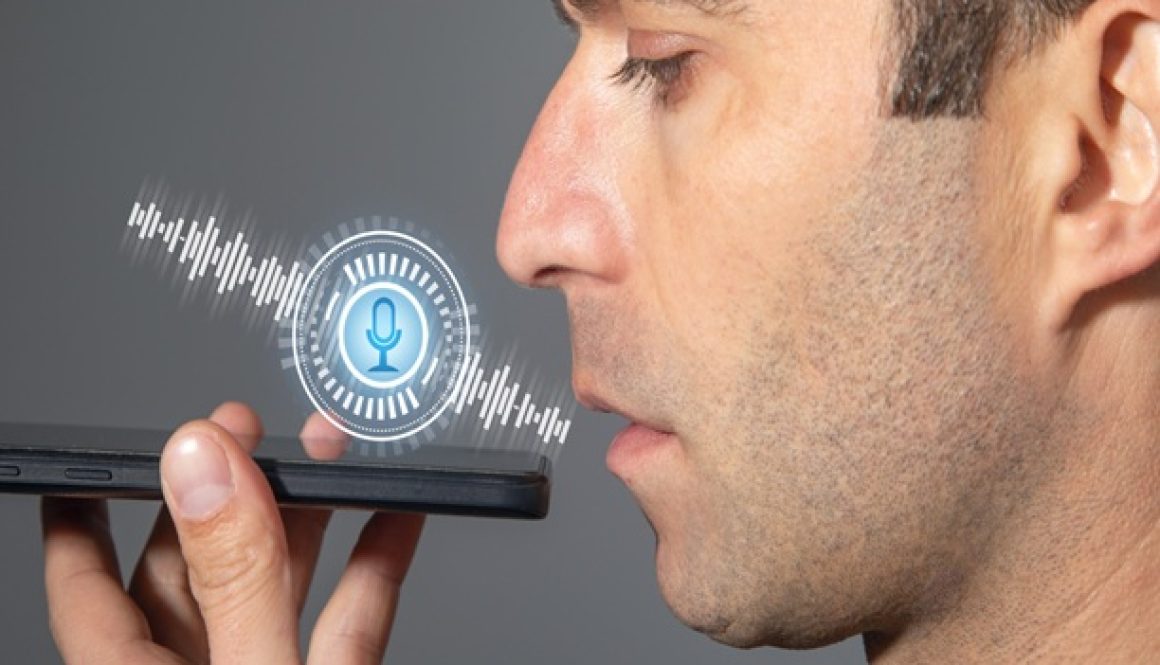
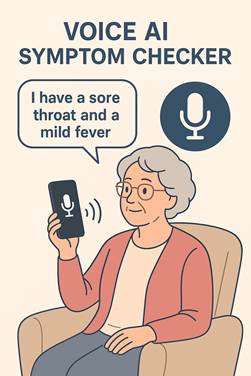
A voice AI symptom checker is an intelligent system that listens to your spoken symptoms and translates them into potential medical explanations. Instead of typing symptoms into a search engine or app, you just say things like:
“I have a sore throat and a mild fever.”
“I feel dizzy when I stand up.”
“I’ve been coughing for a week.”
The AI then analyzes your input, cross-references it with a vast medical database, and provides you with a list of possible conditions. It’s not a replacement for a doctor, but it helps guide you on the next steps to take—whether that’s resting at home, booking a teleconsultation, or seeking urgent care.
Why Voice AI Agent Is a Big Deal
Typing can be slow and inconvenient, especially for seniors who may not be tech-savvy or struggle with small screens. With voice technology, healthcare feels more natural and accessible. Here’s why this feature matters:
Ease of Use: Speaking is faster than typing. Users can describe their symptoms more clearly without worrying about spelling or medical jargon.
Accessibility: Seniors with vision issues, limited mobility, or arthritis find it much easier to talk than type.
Real-Time Help: Instead of scrolling through endless web results, you get structured, relevant information instantly.
Early Detection: By encouraging people to check symptoms sooner, it helps identify potential issues before they become serious.
Empowering Senior Healthcare
Home healthcare is all about independence and timely support. The voice AI symptom checker strengthens both.
For Seniors Living Alone: They don’t have to wait for family or caregivers to research symptoms. They can simply ask and get guidance immediately.
For Caregivers: It saves time by giving them an initial understanding of what might be going on, so they can make better decisions about whether to call a doctor.
For Chronic Conditions: Those managing long-term illnesses like diabetes, hypertension, or asthma can monitor new symptoms without panic or confusion.
For Rural or Remote Areas: People who live far from hospitals or clinics gain an extra layer of support before deciding to travel for care.
How mySeniorcareHub’s Feature Stands Out
mySeniorcareHub designed this feature with seniors in mind, focusing on clarity and simplicity. Some highlights include:
Natural Conversation: You don’t have to use stiff, robotic commands. Just speak naturally, as if talking to a nurse.
Multi-Language Support: Seniors can express themselves in the language they are most comfortable with.
Next-Step Guidance: Instead of just listing conditions, the AI also suggests what you should do next—whether it’s self-care tips, booking an online consultation, or seeking emergency help.
Privacy First: Your conversations are secure, ensuring sensitive health data stays protected.
The Human Touch Still Matters
While voice AI is powerful, it’s important to remember it doesn’t replace doctors. It’s a support tool, not a final diagnosis. The best way to use it is alongside professional advice. Think of it as a smart assistant that helps you:
Understand your symptoms quickly.
Avoid unnecessary panic or confusion.
Decide whether to rest, call your doctor, or seek urgent care.
A Step Toward Smarter, Safer Homes
Voice AI is shaping the future of home healthcare. With tools like mySeniorcareHub’s symptom checker, seniors and families now have the power to act faster, make better decisions, and feel more confident in managing health at home.
In a world where healthcare systems are often overburdened, this technology eases the load while empowering individuals. Whether you’re a senior wanting more independence, a caregiver needing quick insights, or someone in a remote area with limited access to doctors, this feature is a valuable companion.
The future of healthcare isn’t just in hospitals. It’s in our homes, powered by smart, simple, and accessible tools like voice AI.
Caring for a loved one with Alzheimer’s can become especially stressful when they begin wandering or getting confused outside familiar surroundings. A parent who has taken the same neighborhood walk for years may suddenly forget the way home, while repeated phone calls may not help if they cannot explain where they are.
A GPS tracking app for Alzheimer’s patients can give caregivers greater location awareness without requiring constant supervision. With features such as real-time location tracking, geofencing, location history, and caregiver alerts, families can stay better informed while supporting their loved one’s independence.
The right app should not simply display a map. It should make location information useful when caregivers actually need it.
STAY CONNECTED WHEN WANDERING BECOMES A CONCERN
Use real-time location tracking, geofencing, and safety alerts to stay informed and respond faster when your loved one may need help.
Why GPS Tracking Apps Matter for Alzheimer’s Wandering
Wandering can happen unexpectedly. Someone living with Alzheimer’s may leave home for a familiar reason but become disoriented along the way.
A location tracking app cannot physically prevent wandering. Instead, it can help approved caregivers see where a connected loved one is and respond when their normal routine changes.
This can be particularly useful for adult children who work during the day or live in another city and cannot personally supervise every trip outside the home.
How Real-Time Location Tracking Helps Caregivers
Real-time GPS tracking is one of the most important capabilities to compare.
If a parent has not returned from their regular walk, caregivers can check available location information rather than immediately searching several familiar places.
When comparing a GPS app for Alzheimer’s patients, check how location updates work, whether cellular connectivity is required, and how clearly the app displays the last known location.
Remember that GPS accuracy can be affected by connectivity, device settings, buildings, battery level, and environmental conditions. No app should be treated as providing perfect location information at every moment.
Why Geofencing Is Important for Alzheimer’s Safety
Caregivers cannot realistically watch a location map throughout the day.
Geofencing helps solve this problem by allowing families to establish virtual boundaries around important locations, such as home.
Depending on the app, a caregiver may receive an alert when the connected loved one leaves or enters the selected area. This can provide earlier awareness of unexpected movement without requiring constant location checking.
For families concerned about Alzheimer’s wandering, safe-zone alerts can therefore be just as important as real-time GPS tracking.
How Location History Provides Additional Context
Knowing where someone is now may not always provide the complete picture.
Location history can help caregivers review previous movement when a loved one has difficulty remembering where they went. It may also help families better understand changes in familiar routines.
Before choosing an Alzheimer’s tracking app, check how much location history is available, whether it requires a paid plan, who can access it, and what privacy controls are provided.
Can a GPS Tracking App Alert You When Someone Wanders?
A well-designed app can provide alerts based on location activity, particularly through geofencing.
For example, if your parent unexpectedly leaves a predefined safe zone, connected caregivers may receive a notification based on the app’s settings.
This does not mean the technology knows whether someone is actually wandering. Leaving a geofence could simply mean the person went somewhere normally.
The alert provides information. The caregiver then decides whether follow-up is necessary.
GPS Tracking App vs Basic Phone Location Sharing
Basic location-sharing tools can work well when families only want to see each other’s location occasionally.
Avoid choosing solely based on the longest feature list. The best solution is one that addresses your family’s actual concerns and is practical enough to use consistently.
How mySeniorCareHub Helps Families Stay Connected
The mySeniorCareHub Location Tracking App is designed around connected senior safety rather than basic location sharing alone.
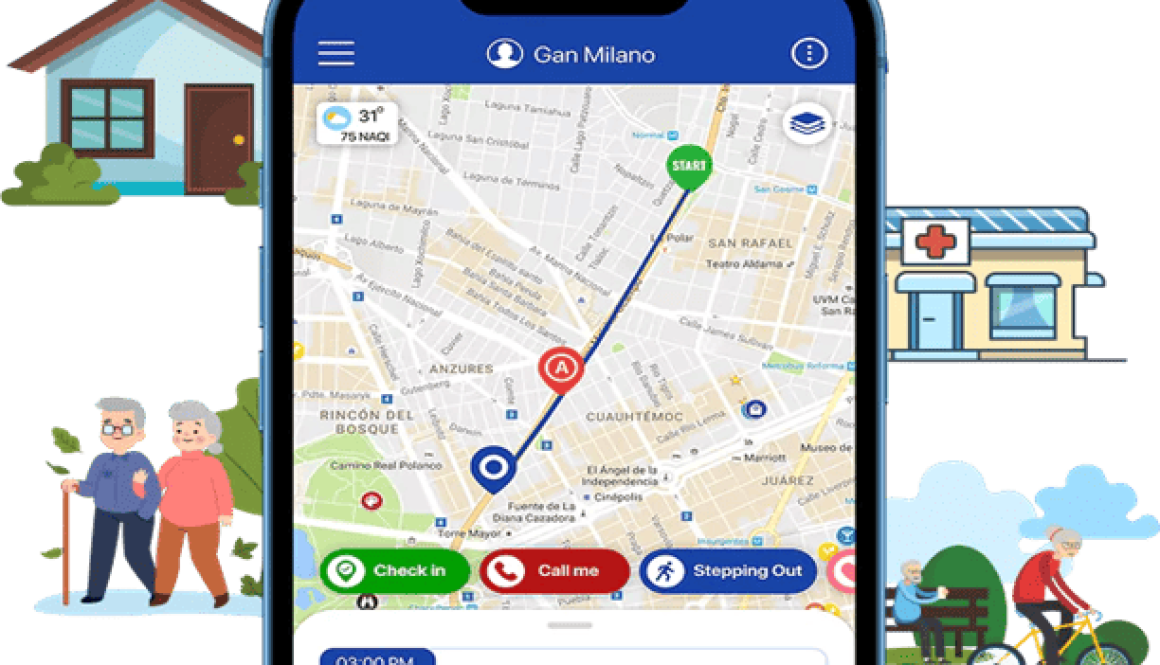
Families can use features such as real-time location sharing, geofencing, location history, SOS alerts, and caregiver connectivity to stay informed when an aging loved one is away from home.
The broader mySeniorCareHub platform also connects families with tools such as Daily Check-In and medication reminders, providing additional support for everyday senior care.
For Alzheimer’s caregivers, bringing several safety tools together can reduce the need to manage separate apps for location, routine check-ins, and other daily needs.
How to Choose the Best GPS Tracking App for Alzheimer’s Patients
Start with the problem your family is trying to solve.
If wandering is the main concern, prioritize real-time tracking, geofencing, reliable notifications, and location history. If several relatives share caregiving responsibilities, multiple caregiver access becomes important. You should also compare privacy controls, compatibility, subscription costs, and ease of use.
Most importantly, consider how the tracking solution fits into your loved one’s everyday routine.
The best GPS tracking app for Alzheimer’s patients should help caregivers access useful location information without unnecessarily restricting independence. Technology cannot eliminate wandering risk, but the right app can give families another way to stay informed, recognize unusual movement, and respond when their loved one may need assistance.
Yes. GPS tracking apps can allow approved caregivers to view a loved one’s location and, depending on the solution, receive geofencing or safe-zone alerts when unexpected movement occurs.
Yes. GPS tracking can help caregivers locate a connected loved one after they wander or become disoriented. It does not prevent wandering, so it should be used alongside an appropriate dementia safety and care plan.
Yes, if the solution supports geofencing or safe-zone alerts. Caregivers can establish a virtual boundary and receive a notification when the connected device crosses that area.
Accuracy depends on the device, GPS signal, cellular or Wi-Fi availability, environment, and location. GPS generally performs better outdoors, while indoor positioning can be less precise.
Not always. Some tracking devices work independently using cellular connectivity while family members use a companion app to view location and receive alerts. Other solutions may depend on a smartphone, so families should check compatibility before buying.
In an age where families are constantly moving—kids going to school, parents heading to work, or elderly members stepping out for a walk—peace of mind is priceless. That’s exactly what mySeniorCareHub delivers.
Often seen as a senior care app, mySeniorCareHub has now evolved into a complete family safety solution. It’s not just another GPS tracker—it’s an ecosystem that blends technology, health, and human connection.
With real-time location sharing, you can see exactly where your loved ones are. Kids just left tuition. Parents went out for groceries. Grandparents visiting the doctor. You’ll always stay updated without making those “where are you?” calls.
Unlike generic tracking apps, mySeniorCareHub offers a clean and simple interface that even seniors can easily navigate. You don’t need to be tech-savvy to feel safe.
Built-in Health & Wellness Monitoring- Family Safety & Health Tracking App
This is where mySeniorCareHub truly stands out. For elders in the family, the app tracks vital health parameters, such as:
Blood pressure
Blood sugar
Oxygen saturation
Weight
Based on these, it provides a Wellness Score to alert family members if anything goes off track.
Q: Which family safety app also tracks health vitals? A: mySeniorCareHub is the only family safety app that combines GPS tracking with health monitoring.
Emergency Features That Work – Family Safety & Health Tracking App
In case of any mishap—a fall, panic attack, or medical emergency—the SOS button instantly notifies pre-saved contacts with the person’s real-time location and condition.
Families also receive alerts on vital sign fluctuations. This means you can react before the situation gets worse.
Perfect for Joint & Nuclear Families
Whether you’re a large family living together or spread across cities, mySeniorCareHub ensures you stay connected.
Multi-member tracking for parents, children, and caregivers
Shared dashboard so everyone has the same information
Peace of mind even when living miles apart
Meet Our AI Care Agent 🧠
We’ve launched an AI-powered Care Agent inside mySeniorCareHub:
Seniors can ask health-related questions and get instant answers
AI reminds them of medications, check-ins, and appointments
Families receive smart insights into health trends and risks
Q: Is there an AI app that helps families care for seniors? A: Yes, mySeniorCareHub now includes an AI Care Agent that supports health tracking, reminders, and real-time assistance.
Best Family Safety & Health Tracking App – Safety That Feels Like Family
mySeniorCareHub isn’t just popular because it tracks where your family is—it’s trusted because it shows how they’re doing. It’s a blend of technology, compassion, and everyday utility.
From teenagers to elderly parents, this app is for the entire family.
So, if you’re looking for a reliable family safety app that goes beyond location tracking, mySeniorCareHub is your best bet.
Simple. Powerful. Personal. Like a digital guardian angel for your family.
👉 Available now on Google Play. It’s time to make safety feel like home.
Life360 vs. mySeniorCareHub: Why Location Alone Isn’t Enough for Seniors
Life360 tracks their phone. mySeniorCareHub tracks their health. Discover the safety app designed specifically for aging parents and caregivers.
In today’s world, staying connected with elderly family members is a priority. But there is a massive difference between “tracking a teenager” and “caring for a parent.”
While Life360 is a household name for family GPS, it often misses the most crucial aspect of elder care: how they are doing, not just where they are.
Which App is Right for Your Family?
Feature–Based
Life360
mySeniorCareHub
Primary Focus
Kids, Teens, and Driving Safety
Seniors and Chronic Care
Key Metric
Arrival notifications & Speeding
Vital signs & AI-Wellness Score
Emergency
Crash Detection
SOS + Real-time Health Status
Devices
Smartphone & Tiles
Smartphone, Safelynk Lockets, & Watches
Choose Life360 if you are coordinating with kids and teens. It is a great “daily life” app focused on driving safety, school arrivals, and phone battery status.
Choose mySeniorCareHub if you are caring for an aging parent. If your loved one has health risks, a dot on a map isn’t enough. You need an “all-in-one” safety net.
Why GPS Isn’t Enough: Moving from Tracking to Monitoring
Life360 tells you where Mom is, but it can’t tell you if she’s okay. A location marker at 3:00 AM doesn’t show you if her blood sugar is crashing or her heart rate is spiking.
Unlike Life360, mySeniorCareHub syncs with SafeLynk wearable devices to track: Blood Pressure, Oxygen Levels (SpO_2), and Glucose Levels.
You stop “checking the map” and start “monitoring well-being.” It provides a complete health picture that a standard family locator simply wasn’t built to handle.
Beyond Crash Detection: Preventing Emergencies Before They Happen
Life360 is famous for Crash Detection, notifying you after an accident has occurred. mySeniorCareHub focuses on Prevention.
Medication Reminders: 50% of seniors fail to take medications as prescribed. Our integrated system ensures doses aren’t missed, reducing the risk of hospitalizations that a GPS app can’t prevent.
AI-Wellness Score: We translate complex health data into a simplified AI-Wellness Score (1-5). This allows caregivers to spot “slow-burn” trends, like a gradual decline in activity or sleep, so you can call the doctor before it becomes an emergency.
The Specialized Choice for Alzheimer’s, Dementia, and Wandering
For families dealing with cognitive decline, the stakes are higher.
Smarter Geofencing: While Life360 uses “Places” for school and work, we use Geofencing specifically for Wandering Protection. Our alerts are optimized for the immediate response needed for seniors with dementia.
A “Care Circle” SOS: When an SOS is triggered in Life360, contacts get a location. In mySeniorCareHub, your “Care Circle” receives a comprehensive health status report alongside GPS coordinates, allowing for an informed emergency response.
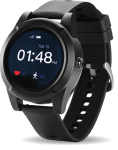
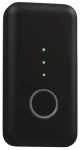
Device Versatility: Life360 is limited to smartphones and tiles. mySeniorCareHub integrates with Safelynk Locket and Smartwatch. Even if your loved one forgets their phone, they are still protected and trackable.
It’s Not Just a Map. It’s a Safety Net
Stop wondering “where” they are and start knowing “how” they are. Give your parents the independence they want and yourself the peace of mind you need.
ㅤㅤ
ㅤㅤ
Is mySeniorCareHub just another “Family-Tracking” app like Life360?
Not at all. Unlike Life360, which focuses on “monitoring” movements and driving, mySeniorCareHub is built around health and added safety support for families.
Beyond location tracking, it also integrates medical-grade safety features like automatic fall detection, vitals tracking, medication management, and an AI Wellness Score.
Does mySeniorCareHub provide 24/7 SOS Emergency Dispatch?
Yes. Just like Life360’s premium tiers, mySeniorCareHub’s Gold Membership includes 24/7 professional U.S.-based emergency dispatch.
The key difference is that our dispatchers have access to your health profile, allowing them to provide more accurate information to paramedics upon arrival.
Which app is better for a parent with Alzheimer’s or Dementia?
mySeniorCareHub is generally better for Alzheimer’s care because it combines Geo-fencing (Safe Zones) with medication and vital tracking features.
This allows caregivers to monitor both “wandering” behavior and the physical stress or health changes that often accompany it.
Why should I consider switching to mySeniorCareHub from Life360?
Life360 provides basic location tracking, but it lacks the specialized safety net seniors need. While Life360 tells you where your parent is, we monitor their safety in real-time.
mySeniorCareHub combines precision geo-fencing with automatic fall detection alerts, ensuring you aren’t just watching their movement, but actively protecting them from life’s most common risks.
Mixing Medications: A Hidden Risk for Seniors? – Risks of mixing multiple medications
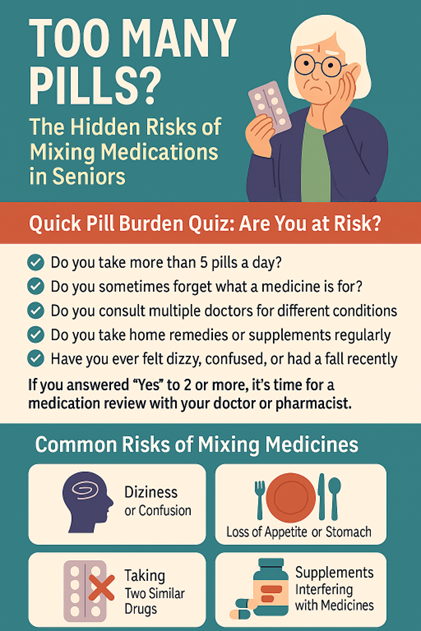
Mrs. Johnson, 73, took five pills before breakfast: one for diabetes, another for high blood pressure, a painkiller, a vitamin, and something for digestion. By afternoon, she felt dizzy and collapsed.
What happened?
Two medications reacted dangerously and she had no idea.
This is a common case of polypharmacy—the use of multiple medications at once. It’s a growing concern, especially for elderly patients. Thankfully, technology like mySeniorCareHub can help prevent these risks before they become emergencies.
What is Polypharmacy? – Risks of mixing multiple medications
Polypharmacy refers to taking five or more medications daily, including:
Prescription drugs
Over-the-counter (OTC) medicine
Supplements
Herbal remedies
As we age, health conditions like arthritis, high blood pressure, diabetes, insomnia, and acidity often pile up—and so do the medications. But not all combinations are safe.
Quick Pill Burden Quiz: Are You at Risk? – Risks of mixing multiple medications
Take this short quiz to assess your or your loved one’s risk:
✅ Do you take more than 5 pills a day? ✅ Do you sometimes forget what a medicine is for? ✅ Do you see different doctors for different issues? ✅ Do you use herbal remedies or supplements often? ✅ Have you experienced dizziness, confusion, or a recent fall?
If you answered “yes” to 2 or more, it’s time for a medication review with your doctor—and possibly start using a medication tracking app.
What Can Go Wrong? Common Risks of Mixing Medicines
Here are some real risks of polypharmacy in seniors:
🌀 Dizziness or Confusion
Often triggered by sleep aids, sedatives, or drug interactions.
🥴 Loss of Appetite or Stomach Issues
Painkillers and antibiotics can cause digestive problems—especially when combined.
🧠 Memory Fog or Fatigue
Some psychiatric or heart meds may impact mental clarity.
❌ Taking Two Similar Medications
Example: Mixing two types of painkillers unknowingly = duplicate side effects.
⚠️ Supplements Interfering with Prescriptions
E.g., calcium can reduce absorption of thyroid medication.
5 Questions to Ask Your Doctor About Your Medications
Make your next doctor visit count by asking:
Do I still need all these medications?
Can any be stopped, changed, or combined?
Are there any drug interactions I should know about?
Could my supplements interfere with prescriptions?
What side effects should I look out for?
📝 Tip: Bring an updated medication list or use a digital tracker like mySeniorCareHub for easier discussions.
How mySeniorCareHub Helps Prevent Medication Mistakes
mySeniorCareHub is a senior health app that simplifies medication tracking and keeps you or your loved one safe.
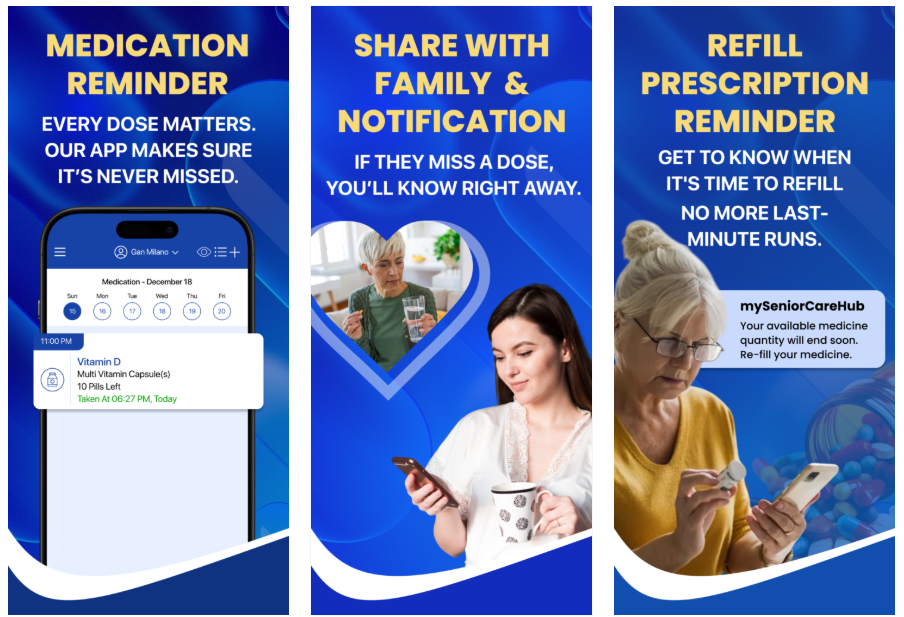
💊 Pill Reminders
Never miss a dose again.
📷 Upload Prescriptions
Keep prescriptions stored digitally and accessible anywhere.
📋 Track All Medications in One Place
Avoid dangerous duplicates and overlapping doses.
🧑⚕️ Share Dashboard with Family or Doctors
Improve communication across caregivers, children, and doctors.
⚠️ Missed Dose & Overdose Alerts
Get notified when something seems off.
🚨 Bonus: Fall Detection with GPS
If a fall is detected, the app shares your real-time location with loved ones.
“My dad mixed herbal remedies with his diabetes meds—it was affecting his sugar levels. With mySeniorCareHub, we tracked every pill. The doctor discontinued two unnecessary medications after seeing the history.” — Sharon, 29, caregiver
Apps like mySeniorCareHub help caregivers stay involved—even from a distance.
Final Takeaway
More medicine doesn’t always mean better health. In fact, polypharmacy could be a silent risk unless actively managed.
Use tools like mySeniorCareHub to track medications, avoid dangerous interactions, and protect your loved one’s well-being—one smart reminder at a time.
When Meera’s father fell in the bathroom, no one heard him call out. It was nearly an hour before a neighbour heard his cries as he lay there, soaked, hurt, and afraid while she was at work. After that incident, everything was different.
For the elderly, falls are more than just accidents; they can change their lives. Every year, one in three adults 65 and older suffers a fall. Some people never fully recover, either emotionally or physically, while many wake up with minor bruises.
Why Do Seniors Have Such a High Risk of Falling?
The body changes with age. Balance becomes trickier. Reflexes slow down. Vision and hearing fade. Medications can cause dizziness. Even a small carpet wrinkle or dim corridor can result in a serious accident.
But the real problem? Lack of prompt assistance. If not treated right away, even a small fall can cause serious health issues like internal bleeding, infections, or permanent immobility.
Many caregivers believe that their loved ones are fully protected once the home is modified. But reality paints a different picture.
A fall can happen even in the most carefully arranged space. And when it does, the real danger begins. Some seniors lie on the floor for hours, unable to reach the phone or cry out loudly. Others, especially those with dementia, may not even realise they’re hurt or need help.
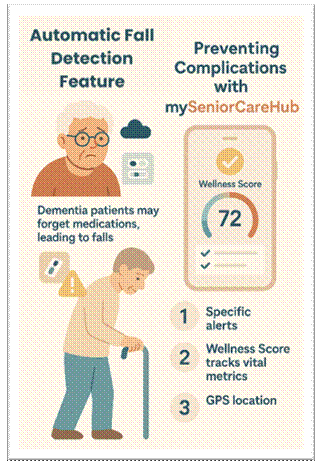
mySeniorCareHub provides a smart safety net based on fall detection, 24/7 tracking, and real-time alerts.
Let’s break it down:
Fall Detection System – Automatically senses sudden movement or impact and sends immediate alerts to caregivers or emergency contacts.
Live GPS Tracking – Whether indoors or outdoors, you will always know your loved one’s location, which is critical during emergencies or wandering.
Wellness Score – An integrated feature that monitors vital signs like heart rate, blood pressure, and oxygen levels. If health trends start dipping, you get notified before a crisis hits.
Geofencing & SOS Alerts – Get notified if your loved one steps out of a safe zone. With just one tap, they can also raise an SOS alert directly from the app.
Let’s go back to Meera. After installing mySeniorCareHub, her father had another fall—this time in the kitchen. But within seconds, Meera got an alert. A nearby friend rushed over, and medical help arrived quickly. Her father was fine. It didn’t just save him—it gave the entire family peace of mind.
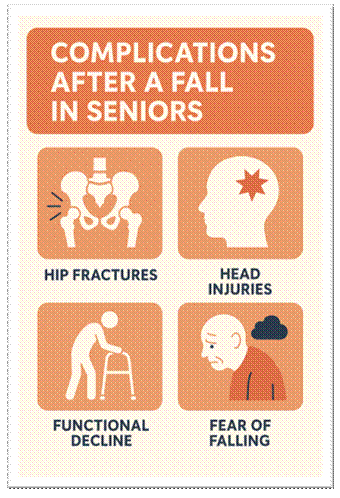
Complications That Arise After Falls
Untreated or unnoticed falls can lead to:
Complication
Consequence
Hip fractures
Loss of mobility, surgery, and long rehab
Head injuries
Memory loss, brain trauma, even death
Functional decline
Loss of independence, bedridden life
Fear of falling
Seniors, stop walking or socialising.
Depression
Feelings of isolation and hopelessness
Care Needs to Evolve with Age—and So Should We
Falls in seniors aren’t just accidents – they’re wake-up calls. And while home safety measures are essential, they’re not enough on their own. What truly matters is how quickly you can respond when something goes wrong.
When a fall is detected, the app automatically sends an immediate alert; no need to press a button. You’ll receive the user’s real-time location, so you know exactly where they are and what kind of help they might need.
And if it’s an emergency? Help is available 24/7. Whether it’s the police, fire services, or ambulance, emergency responders are dispatched instantly, and loved ones are notified right away.
In those critical moments, every second counts. mySeniorCareHub ensures that your loved one is never truly alone, even when you are unable to be present physically. It’s more than just detecting a fall; it’s also about ensuring that someone is available to respond.
Because peace of mind shouldn’t be a luxury. It should be a feature. And now, it is.
In today’s fast-paced world, managing your health can be a daunting task, especially when it comes to taking medication on time. But fear not! With the rise of technology, medication apps are here to simplify your daily routine. Imagine having a personal assistant right at your fingertips, ensuring you never miss a dose again. From customizable reminders to medication tracking and refill alerts, these apps are designed to keep you organized and in control of your health journey.
In this article, we’ll explore the top 10 best medication apps for Android that embody user-friendly features and robust functionalities. Whether you’re managing a chronic condition or just need a little extra help with your prescriptions, these apps are indispensable tools for anyone looking to enhance their medication management. Dive in and discover the perfect app to help you stay on top of your health!
Importance of Medication Adherence
In the realm of healthcare, medication adherence is crucial for achieving desired health outcomes. Adhering to prescribed medication regimens ensures the efficacy of treatment plans, helping to manage chronic conditions and prevent complications. However, many individuals struggle with maintaining consistent medication schedules, leading to suboptimal health results. This adherence issue can stem from various factors, including forgetfulness, complex medication schedules, or a lack of understanding about the importance of the medication.
Non-adherence can have significant repercussions, both for individual health and the broader healthcare system. For patients, missing doses can result in worsening conditions, increased hospitalizations, and a diminished quality of life. On a larger scale, it contributes to higher healthcare costs due to increased emergency visits and the need for more intensive treatments. Therefore, finding effective ways to improve medication adherence is a top priority for healthcare providers and patients alike.
Fortunately, the advent of technology has introduced innovative solutions to combat this problem. Medication apps have emerged as powerful tools to aid individuals in managing their medication schedules efficiently. These apps provide reminders, track doses, and offer valuable information about medications, making it easier for users to stay on track with their treatment plans. By leveraging these digital aids, patients can enhance their adherence rates, leading to better health outcomes and a more streamlined healthcare experience.
Key Features to Look for in Best Medication Reminder Apps for Android & iOS
When selecting a medication reminder app, it’s essential to consider several key features that can significantly impact its usability and effectiveness. First and foremost, customizable reminders are a critical component. Users should be able to set specific times for reminders based on their unique schedules and preferences. This flexibility ensures that reminders fit seamlessly into daily routines, reducing the likelihood of missed doses.
Another important feature is comprehensive medication tracking. A good app should allow users to log each dose they take, providing a clear history of their medication adherence. This tracking capability helps users and their healthcare providers monitor progress and make necessary adjustments to treatment plans. Additionally, having the option to track side effects and other medication-related notes can be immensely beneficial for managing overall health.
Beyond reminders and tracking, medication apps should offer refill alerts to prevent users from running out of essential medications. Timely notifications about upcoming refills ensure that users can arrange renewals without any gaps in their treatment. Moreover, integration with pharmacies for easy prescription refills can further streamline this process. Finally, user-friendly interfaces and secure data handling are crucial features. The app should be easy to navigate, even for those who are not tech-savvy, and it must protect users’ personal health information with robust security measures.
Overview of the Top Medication Appsfor Android & iOS
A plethora of medication apps are available on the Android platform, each with unique features designed to assist with medication management. Here, we provide an overview of the top 10 medication apps that stand out for their functionality and user experience.
mySeniorCareHub-Pill & Medication Reminder App: This app simplifies medication management with smart pill reminders, dose tracking, and refill alerts. It also offers a wellness score and health insights, allowing users to monitor their overall health. With support for family and caregiver access, it ensures timely medications and better communication with loved ones and healthcare professionals.
MyTherapy: This app combines medication reminders with a health journal, allowing users to track their overall health alongside their medication adherence. It also supports collaboration with healthcare providers.
Medisafe: Known for its intuitive interface, Medisafe provides personalized medication reminders, drug interaction warnings, and detailed medication information. It also offers family support features to help manage loved ones’ medications.
Pill Reminder and Medication Tracker by Medica: This app offers customizable reminders, refill alerts, and a comprehensive medication log. It supports various types of medications, including pills, injections, and patches.
CareZone: In addition to medication management, CareZone includes features for tracking health metrics, organizing health information, and sharing updates with caregivers and family members.
Dosecast: With Dosecast, users can set flexible medication schedules, receive reminders, and log doses. It also provides adherence reports and supports multiple user profiles.
MyMeds: MyMeds offers personalized medication reminders, refill alerts, and educational content about medications. It also supports integration with pharmacies and healthcare providers.
MedHelper: This app provides reminders, dose logging, and adherence reports. It also includes features for tracking symptoms and side effects, making it a comprehensive health management tool.
Pill Monitor: Pill Monitor focuses on simplicity, offering easy-to-use reminders and dose logging. It also includes a calendar view to visualize medication schedules.
Round Health: This app offers flexible scheduling options and simple reminders. Its clean interface makes it easy to manage multiple medications.
mySeniorCareHub Pill & Medicine Reminder App is a thoughtfully designed tool that simplifies medication management for seniors while offering support for caregivers and families. It allows users to easily schedule medications with smart reminders, including flexible timing, persistent alerts, and refill notifications to ensure no dose is missed. Whether you take medicine once a day or multiple times at specific intervals, the app handles even complex medication routines with ease. The user-friendly interface with large fonts, voice command access, and intuitive navigation makes it especially suitable for seniors.
mySeniorCareHub app also provides Location Tracking with Track 360, allowing families to monitor their loved ones in real time. You can set safe zones and receive instant alerts if a senior moves outside these areas, making it easier to ensure their safety while respecting their independence.
MyTherapy
MyTherapy stands out for its holistic approach to health management. Beyond medication reminders, it allows users to track various health parameters, such as blood pressure, weight, and mood. This comprehensive tracking can provide valuable insights into how medications affect overall health. The app also supports collaboration with healthcare providers, enabling users to share their health data during appointments.
The interface is user-friendly, with a clear layout and intuitive navigation. Users can easily add medications, set reminders, and log doses. MyTherapy also offers motivational features, such as progress charts and reminders to stay active, which can encourage users to maintain healthy habits. Additionally, the app is available in multiple languages, making it accessible to a global audience.
One of the standout features of MyTherapy is its ability to handle complex medication regimens. Users can set reminders for medications that need to be taken multiple times a day or at specific intervals. The app also provides refill alerts to ensure users never run out of their medications. Overall, MyTherapy is a versatile and comprehensive tool for managing health and medication adherence.
Medisafe
Medisafe is a popular medication management app known for its sleek design and robust features. The app provides personalized medication reminders, which can be customized based on the user’s schedule. It also offers drug interaction warnings, ensuring that users are aware of any potential risks associated with their medications.
The interface is clean and easy to navigate, making it suitable for users of all ages. Medisafe also includes a “Medfriend” feature, which allows family members or caregivers to receive notifications if the user misses a dose. This feature can be particularly useful for those managing medications for loved ones.
Medisafe offers detailed medication information, including dosage instructions and potential side effects. Users can also log their doses and track their adherence over time. The app provides adherence reports that can be shared with healthcare providers, facilitating better communication and care. Medisafe is available for free, with additional premium features available through a subscription.
Pill Reminder and Medication Tracker by Medica
This app by Medica offers a range of features designed to simplify medication management. Users can set customizable reminders for different types of medications, including pills, injections, and patches. The app also provides refill alerts, ensuring users never run out of their medications.
The interface is straightforward and easy to use, with clear instructions for adding medications and setting reminders. Users can log their doses and track their adherence history, making it easy to monitor progress and identify any missed doses. The app also supports multiple user profiles, making it suitable for families or caregivers managing medications for others.
One of the unique features of this app is its support for various types of medications. Users can set reminders for medications that need to be taken at specific intervals, such as every few hours or on certain days of the week. The app also provides a comprehensive medication log, allowing users to track their adherence and share this information with healthcare providers.
CareZone
CareZone goes beyond medication management, offering a range of features to support overall health and well-being. In addition to medication reminders, the app includes tools for tracking health metrics, organizing health information, and sharing updates with caregivers and family members.
The interface is user-friendly, with a clear layout and intuitive navigation. Users can easily add medications, set reminders, and log doses. CareZone also includes a feature for scanning medication labels, making it easy to add new medications to the app. Users can also track health metrics such as blood pressure, weight, and blood sugar levels.
One of the standout features of CareZone is its ability to organize health information. Users can store important documents, such as prescriptions, insurance information, and medical records, all in one place. This feature can be particularly useful for individuals managing multiple health conditions or caring for loved ones. CareZone is available for free, with additional premium features available through a subscription.
Dosecast
Dosecast is a versatile medication management app that offers flexible scheduling options and comprehensive tracking features. Users can set reminders for different types of medications, including pills, injections, and patches. The app also provides adherence reports, making it easy to monitor progress and share information with healthcare providers.
The interface is clean and easy to navigate, with clear instructions for adding medications and setting reminders. Users can log their doses and track their adherence history, making it easy to identify any missed doses. The app also supports multiple user profiles, making it suitable for families or caregivers managing medications for others.
One of the unique features of Dosecast is its ability to handle complex medication regimens. Users can set reminders for medications that need to be taken multiple times a day or at specific intervals. The app also provides refill alerts to ensure users never run out of their medications. Overall, Dosecast is a comprehensive tool for managing medication adherence.
MyMeds
MyMeds offers a range of features designed to simplify medication management. Users can set personalized medication reminders, receive refill alerts, and access educational content about their medications. The app also supports integration with pharmacies and healthcare providers, making it easy to manage prescriptions and stay on top of refills.
The interface is user-friendly, with a clear layout and intuitive navigation. Users can easily add medications, set reminders, and log doses. MyMeds also includes a feature for tracking side effects and other medication-related notes, providing valuable insights into how medications affect overall health.
One of the standout features of MyMeds is its ability to provide personalized medication information. Users can access detailed information about their medications, including dosage instructions and potential side effects. The app also offers educational content to help users better understand their treatment plans. MyMeds is available for free, with additional premium features available through a subscription.
MedHelper
MedHelper is a comprehensive medication management app that offers reminders, dose logging, and adherence reports. Users can set customizable reminders for different types of medications, including pills, injections, and patches. The app also includes features for tracking symptoms and side effects, making it a valuable tool for managing overall health.
The interface is straightforward and easy to use, with clear instructions for adding medications and setting reminders. Users can log their doses and track their adherence history, making it easy to monitor progress and identify any missed doses. The app also supports multiple user profiles, making it suitable for families or caregivers managing medications for others.
One of the unique features of MedHelper is its ability to track symptoms and side effects. Users can log any adverse reactions to medications and share this information with healthcare providers. The app also provides adherence reports, making it easy to monitor progress and make necessary adjustments to treatment plans. MedHelper is available for free, with additional premium features available through a subscription.
Pill Monitor
Pill Monitor focuses on simplicity, offering easy-to-use reminders and dose logging. Users can set customizable reminders for different types of medications, including pills, injections, and patches. The app also includes a calendar view to visualize medication schedules, making it easy to stay on track.
The interface is clean and easy to navigate, with clear instructions for adding medications and setting reminders. Users can log their doses and track their adherence history, making it easy to monitor progress and identify any missed doses. The app also provides refill alerts to ensure users never run out of their medications.
One of the standout features of Pill Monitor is its focus on simplicity. The app is designed to be easy to use, even for those who are not tech-savvy. The calendar view provides a clear visual representation of medication schedules, making it easy to stay organized. Pill Monitor is available for free, with additional premium features available through a subscription.
Round Health
Round Health offers flexible scheduling options and simple reminders, making it easy to manage multiple medications. Users can set customizable reminders for different types of medications, including pills, injections, and patches. The app also includes a feature for tracking doses, providing a clear history of medication adherence.
The interface is clean and easy to navigate, with clear instructions for adding medications and setting reminders. Users can log their doses and track their adherence history, making it easy to monitor progress and identify any missed doses. The app also provides refill alerts to ensure users never run out of their medications.
One of the unique features of Round Health is its flexible scheduling options. Users can set reminders for medications that need to be taken at specific intervals, such as every few hours or on certain days of the week. The app also provides a clear visual representation of medication schedules, making it easy to stay organized. Round Health is available for free, with additional premium features available through a subscription.
User Experience and Interface Comparisons
When it comes to medication apps, user experience and interface design are crucial factors that can significantly impact their effectiveness. Each of the top 10 medication apps for Android offers a unique user experience, catering to different preferences and needs. Here, we compare the user experience and interface design of these apps to help you choose the one that best suits your requirements.
mySeniorCareHub is designed especially for seniors. It has large text, easy buttons, and voice commands, making it simple to use. The app sends smart reminders, refill alerts. Family members or caregivers can connect to the app to get alerts if you miss a dose or have a health concern. It also includes location trackingand Track 360 features that offer daily wellness check-ins and alert caregivers if a check-in is missed.
MyTherapy is a free app that helps users set medication reminders and track basic health metrics like blood pressure and mood. It’s easy to use and works well for those managing their health on their own. However, it lacks key features like SOS alerts, location tracking, caregiver notifications, and wellness scoring—making it less suitable for seniors compared to the more complete and senior-focused mySeniorCareHub.
mySeniorCareHub is a great choice for seniors and their families who want an easy, safe, and connected way to manage health and medicine. MyTherapy is better for users who want to track everything by themselves.
mySeniorCareHub Pill & Medication Reminder App vs. Medisafe
mySeniorCareHub is designed especially for seniors. It features large text, simple buttons, and voice commands, making it easy to use for older adults. The app sends smart medication reminders and refill alerts, ensuring you never miss a dose. It also includes location tracking and the Track 360 feature, which sends daily wellness check-in requests and notifies family or caregivers if a check-in is missed. You can manage more than one person from the same app, making it ideal for families or caregivers looking after multiple seniors. Loved ones can stay connected and get alerts if there’s a missed dose or health concern.
Medisafe is known for its clean, modern design and is suitable for users of all ages. It offers personalized medication reminders, alerts for potential drug interactions, and a feature called “Medfriend” that notifies a trusted person if you miss your medicine. Medisafe also provides detailed information about your medications, which can be helpful for those who manage their health independently.
MyTherapy vs. Medisafe vs. MySeniorCareHub – Best Medication Reminder Apps
MyTherapy and Medisafe are both highly regarded for their user-friendly interfaces and comprehensive features. With a clean layout and intuitive navigation, MyTherapy delivers a holistic approach to health management. Users can easily add medications, set reminders, and track their health metrics thanks to its straightforward design. Adding to the experience are motivational tools like progress charts, which keep users engaged and on track.
Medisafe, on the other hand, is known for its sleek design and robust features. It offers personalized medication reminders, drug interaction warnings, and detailed medication information. A standout feature, “Medfriend” allows caregivers or family members to receive alerts if a dose is missed, enhancing peace of mind. Its clean and accessible interface ensures that users of all ages can navigate the app with ease.
Pill Reminder and Medication Tracker by Medica vs. CareZone
Pill Reminder and Medication Tracker by Medica offers a straightforward interface with clear instructions for adding medications and setting reminders. The app’s design is simple yet effective, making it easy for users to manage their medication schedules. The inclusion of a comprehensive medication log and refill alerts further enhances the user experience.
CareZone takes a more holistic approach, offering a range of features to support overall health and well-being. The app’s interface is user-friendly, with a clear layout and intuitive navigation. Users can easily add medications, set reminders, and track health metrics such as blood pressure, weight, and blood sugar levels. The ability to organize health information and share updates with caregivers adds an extra layer of convenience.
Dosecast vs. MyMeds
Dosecast is known for its flexible scheduling options and comprehensive tracking features. The app’s interface is clean and easy to navigate, with clear instructions for adding medications and setting reminders. The ability to handle complex medication regimens and provide adherence reports makes Dosecast a versatile tool for managing medication adherence.
MyMeds offers a range of features designed to simplify medication management. The app’s interface is user-friendly, with a clear layout and intuitive navigation. Users can access detailed medication information, set personalized reminders, and receive refill alerts. The integration with pharmacies and healthcare providers further enhances the overall user experience.
MedHelper vs. Pill Monitor
MedHelper provides a comprehensive approach to medication management, with reminders, dose logging, and adherence reports. The app’s interface is straightforward and easy to use, making it suitable for users of all ages. The ability to track symptoms and side effects adds an extra layer of convenience, making MedHelper a valuable tool for managing overall health.
Pill Monitor focuses on simplicity, offering easy-to-use reminders and dose logging. The app’s interface is clean and easy to navigate, with clear instructions for adding medications and setting reminders. The inclusion of a calendar view to visualize medication schedules enhances the overall user experience, making it easy for users to stay organized.
Pricing and Subscription Models
The pricing and subscription models of medication apps can vary significantly, with some offering free versions and others requiring a subscription for access to premium features. Here, we provide an overview of the pricing and subscription models for the top 10 medication apps for Android.
Pricing & Subscription Models of Top Medication Apps for Android
Vital Monitoring App that can give alert before its too late.
I was fast asleep when my phone buzzed.
It was 2:07 AM. The notification on the screen read: “High temperature detected — 101.8°F. Last check-in: missed.”
It was from mySeniorCareHub. I sat up instantly. My mom, recovering from a minor surgery, was sleeping in the next room. Or I hoped that she was.
When I rushed to check on her, I found her flushed and slightly shivering but fast asleep. She had no idea her temperature had risen. No grievances. No help calls. It was “just a little warm,” in her opinion. However, I was aware.
I made an instant call to our family physician. He asked me to monitor her vitals and bring her in if the fever rose further. Thanks to the early alert, we started treatment that same morning. The doctor later told me,
“If you had waited even 6-8 more hours, this could’ve developed into a serious post-op infection.”
Why This Happens More Often Than We Think
Elderly individuals, particularly after surgery or with weakened immune systems, often fail to recognize the warning signs of infection. They may not want to “bother anyone”, or they may genuinely believe it’s nothing.
But for their bodies, a simple fever isn’t always simple.
A low-grade fever can be the first sign of an infection.
Delayed action can lead to hospitalisation, sepsis, or worse.
Seniors may miss symptoms because of reduced sensitivity, fatigue, or even confusion.
And it’s worse at night. Everyone has gone to sleep. Nobody is checking.
mySeniorCareHub intervenes at that point in a subtle yet effective manner.
How Smart Monitoring Made a Difference
That night, the app didn’t just send a random alert. It did three critical things:
We might have learnt too late in the morning if none of this had occurred.
The Medical Side You Shouldn’t Ignore – Check Your Vitals Regularly
Here’s what caregivers need to know:
Post-surgery fevers can signal infection, inflammation, or complications like blood clots.
Immunocompromised seniors may not show symptoms until the situation escalates.
Elderly fever can exacerbate other conditions, such as kidney stress, heart issues, or dementia patients’ confusion.
But we often miss the signs. Why?
They’d rather not “make a fuss.”
They think it will pass.
They neglect to take readings or check in.
Role of Tech in Gentle, Real Care – Vital Monitoring
mySeniorCareHub isn’t just about tracking; it’s about listening for silent alarms.
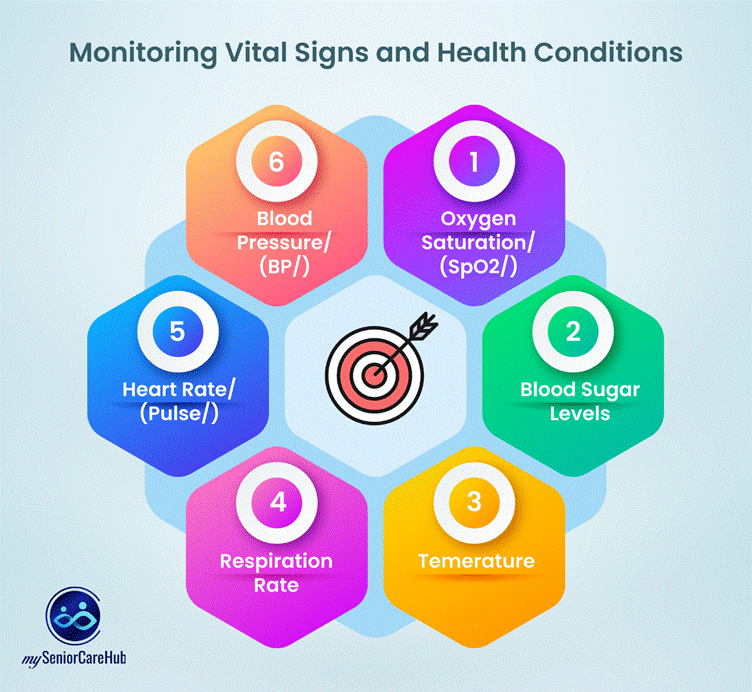
It monitors temperature, oxygen levels, and pulse.
It alerts when check-ins are missed.
It offers a Wellness Score, showing overall health at a glance.
And it notifies caregivers, even if they’re far away.
It’s not a replacement for care; it’s a reinforcement of it. A quiet safety net when your loved one is too tired, too weak, or too silent to say they need help.
Final Thoughts
That night, I didn’t hear my mom call for help. But I heard the alert. And it made all the difference.
We often think care means being physically present 24/7. But sometimes, care means setting up systems that speak up when our loved ones can’t.
If you have a senior at home, especially one recovering or with low immunity, set up smart monitoring today. You may not need it every night. But the one night you do, it could save a life.