Yes apps like mySeniorCareHub offer geofencing features that notify you immediately if your elderly parent steps out of a defined safe area.
Caring from a Distance, Without Intrusion
If your aging parent lives alone or is dealing with memory loss, every moment of silence can trigger anxiety. Missed calls, delayed walks, and unannounced outings aren’t always emergencies but they feel like they could be.
You don’t want to invade their independence. But you do want a way to be alerted if something’s off. That’s where geofencing steps in—a smart, respectful solution offered by mySeniorCareHub’s Location Tracking App.
What Is Geofencing and How Does It Work?
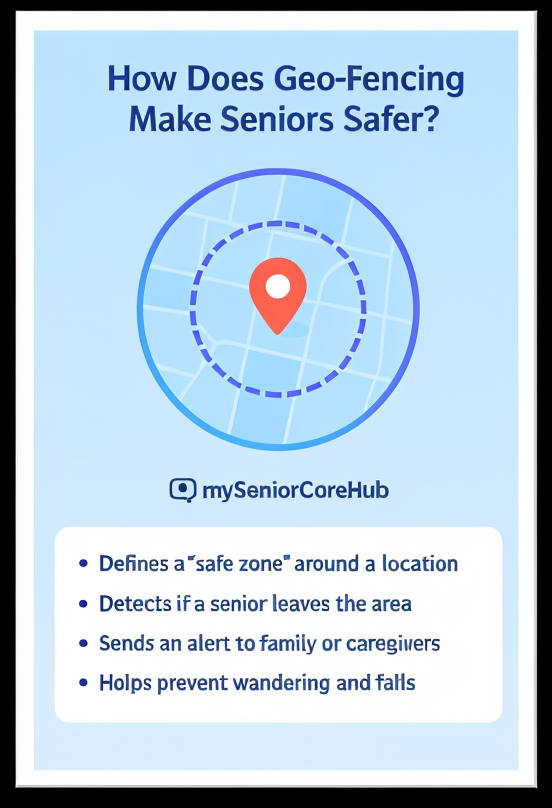
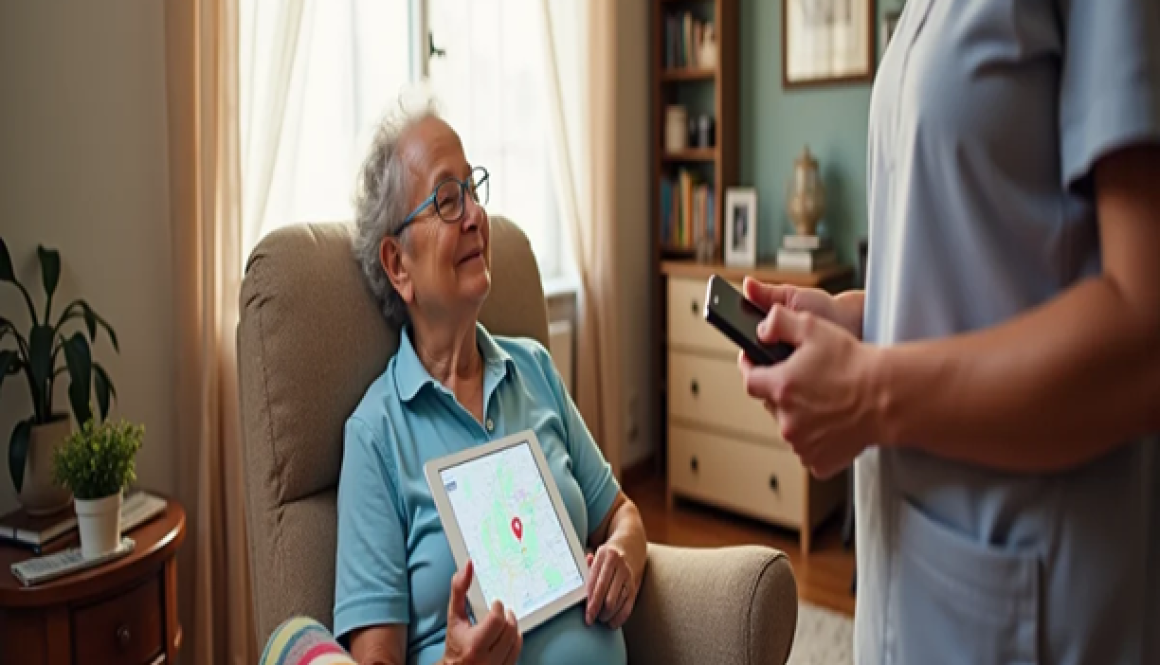
Geofencing allows you to set up virtual boundaries also called “safe zones” around familiar areas like home, local parks, temples, or the grocery store. Once set, the app will instantly notify you if your parent crosses those boundaries.
Why mySeniorCareHub Is the Best Geofencing App for Seniors
Unlike generic tracking apps, mySeniorCareHub is designed for senior care. It offers safety features with a human touch balancing independence with support.
Create multiple geofences based on your parent’s daily routine,not just fixed circles on a map.
🔔 Intelligent Alerts
Get notified only when it matters. Avoid false alarms and unnecessary panic.
📍 Real-Time Path Tracking
See your parent’s current route in real time—without having to call or text repeatedly.
🚨 Integrated Fall Alerts
If a fall occurs outside the safe zone, the app sends both a fall alert and exact GPS location instantly.
📱 No Wearables Needed
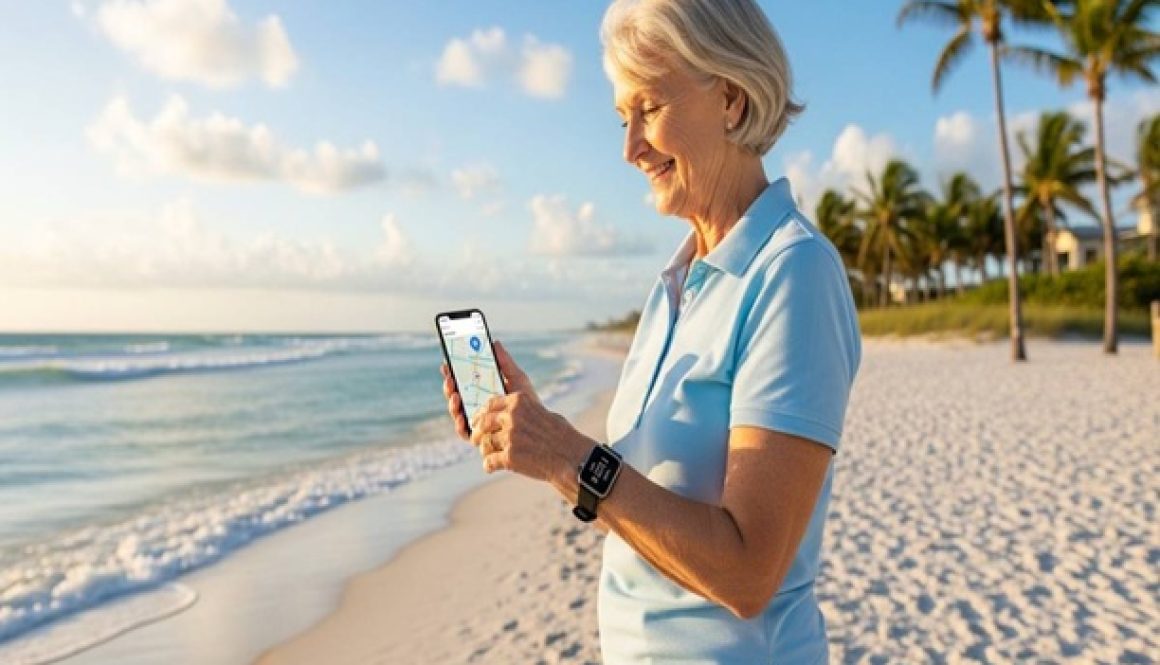
No smartwatch or extra device required—just a smartphone and a simple setup.
Learns Their Routine Over Time
As your parent continues to use the app, mySeniorCareHub adapts to their habits. It recognizes patterns like your mother’s evening temple visits or your father’s morning walks and reduces unnecessary alerts while keeping you informed of unusual activity.
You’re Not Monitoring, You’re Caring
Installing the mySeniorCareHub Location Tracking App isn’t about surveillance. It’s about building a silent safety net one that empowers you to act when it truly matters, and empowers your parent to live freely.
Because real caregiving isn’t about watching every move, it’s about being there right when you’re needed. And with mySeniorCareHub, you always will be.
In 2026, safety and independence are no longer a trade-off. As the senior population grows, with projections indicating that by 2036, nearly 1 in 7 people will be over 60, technology has stepped up to bridge the gap between caring and hovering.
Whether your parents are aging in place or navigating early cognitive changes, a reliable GPS tracking app is the ultimate safety net. Here is the definitive guide to the best GPS tracking apps for elderly parents in 2026, featuring the latest data and our top pick for the year.
Why Seniors Need GPS Tracking? (Stats)
The demand for “Aging in Place” has hit an all-time high. Recent 2025-26 data highlights why location-aware care is essential:
Wandering Risks: Research from NIH shows that up to 60% of people with dementia will wander at least once, potentially leading to dangerous disorientation.
The “Alone” Factor: Approximately 25% of older adults are “solo agers” living alone, increasing the need for remote monitoring.
Fall Hazards: Falls remain the leading cause of injury-related emergency visits for those over 65. In 2026, mobile app connectivity for fall detection has grown by 28% to address this.
Smartphone Adoption:89% of adults aged 50+ now own a smartphone, making app-based solutions more accessible than bulky, expensive hardware.
#1 GPS Tracking App of 2026: mySeniorCareHub
After evaluating the latest software-based tracking solutions, mySeniorCareHubapp stands out as the premier choice for 2026.
While other apps focus solely on dots on a map, mySeniorCareHub integrates location with comprehensive health management, all without requiring extra wearable devices.
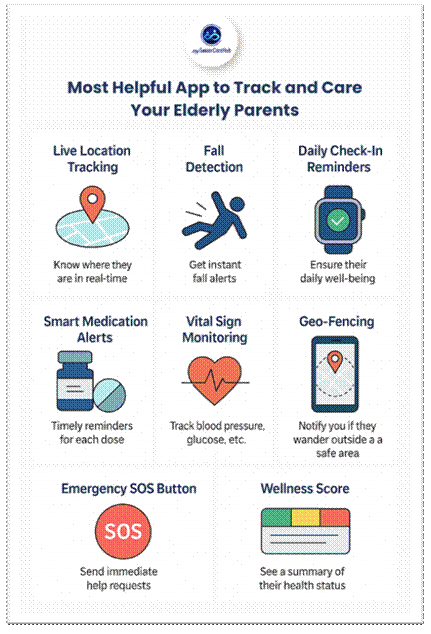
Real-Time Precision Monitoring: Offers high-accuracy GPS Tracking that works both indoors and outdoors, ensuring you know exactly where your parent is, whether they’re at the local market or a friend’s home.
Advanced Geofencing (Safe Zones): You can set virtual boundaries around “safe” areas. If your parent leaves these zones, you get an instant smartphone notification crucial for preventing wandering incidents before they escalate.
Integrated Fall Detection: Utilizing the smartphone’s internal sensors (accelerometers), the app detects sudden impacts and automatically shares the senior’s exact location with emergency contacts.
Zero Hardware Maintenance: Unlike pendants or watches that require constant charging and can be easily forgotten, mySeniorCareHub lives on the phone they already carry.
Holistic Health Dashboard: It’s more than a tracker. Caregivers can monitor blood pressure, blood sugar, and medication schedules within the same interface.
A common misconception is that seniors can’t use apps. However, 98% of seniors with mobile phones use them every day. Our mySeniorCareHub app is designed with this reality in mind, featuring:
High-Contrast Design: Large icons and clear text for those with visual impairments.
SOS Quick-Action: A prominent emergency button that triggers an alert and shares location data in one tap.
Voice Integration: Compatible with voice commands for seniors who prefer talking over typing.
Final Verdict: Why mySeniorCareHub Wins
In 2026, the best care is the kind that doesn’t feel like a burden. mySeniorCareHub app provides the “invisible” safety net that families need. It empowers seniors to maintain their dignity and independence while giving caregivers the data-driven peace of mind they deserve.
By combining GPS tracking with vital health metrics and fall detection, it is the most comprehensive, cost-effective, and user-friendly tool available for senior safety today.
Are You Ready To Secure Your Parents’ Independence?
No long-term contracts. Set up in minutes. Cancel anytime.
People Also Asked: GPS Tracking App For Seniors
Is a GPS tracking app better than a wearable GPS watch?
In 2026, many families prefer apps like mySeniorCareHub over hardware because they eliminate “device fatigue.” Wearables require daily charging, can be uncomfortable, and are often forgotten on the nightstand.
Since 89% of seniors carry their smartphones, app-based solutions ensure tracker is always there without adding burden of extra gear.
How does the “Fall Detection” work without a wearable sensor?
Modern smartphones in 2026 are equipped with high-precision accelerometers and gyroscopes. mySeniorCareHub app uses advanced AI algorithms to distinguish between a phone being dropped and a “human-scale” fall.
If a potential fall is detected, app triggers and sends an alert with senior’s exact coordinates to emergency contacts immediately.
Does GPS tracking drain the phone’s battery?
While older GPS technology was notorious for battery drain, the 2026 version of mySeniorCareHub is optimized for “Passive Monitoring.”
It uses a combination of GPS, Wi-Fi triangulation, and cellular towers to minimize power consumption, ensuring the phone stays charged throughout the day while still providing real-time updates.
How do I talk to my parents about using a tracking app without upsetting them?
Privacy is the #1 concern for seniors. Experts suggest framing the conversation around “mutual peace of mind” rather than “monitoring.”
The Safety Net: Remind them that in 2026, 6 in 10 seniors with memory issues may experience disorientation; having a safety net isn’t about losing freedom; it’s about protecting it.
Highlight Independence: Explain that our mySeniorCareHub app actually allows them to go on walks and travel more freely because help is just one tap away.
Focus on Health: Since mySeniorCareHub also tracks vitals like blood pressure and medication, it feels less like a “tracker” and more like a comprehensive health assistant.
Keeping track of elderly loved ones shouldn’t feel like a chore or an invasion of privacy. In 2026, the best location tracking app balance smart safety with personal independence.
Whether you’re a “sandwich generation” parent managing kids and aging parents, or simply want to ensure your family’s devices are secure, finding the right tool is the definitive way to gain peace of mind.
In 2026, mySeniorCareHub stands out as the premier choice for families who need more than just a dot on a map – it’s a comprehensive wellness companion.
Quick Answer: 2026 Winners
In 2026, If you’re in a hurry to find the perfect location tracking app, here’s the bottom line:
Better Choice for Teens Families: Life360 – A gold standard for real-time “circles” and driving safety.
Best for Device Security: Apple Find My (iOS) & Google Find My Device (Android).
Overall Best App for Seniors: mySeniorCareHub – Specifically built for elder care with fall detection and safety + health integration.
Protect Your Elderly Loved Ones Today
Join thousands of families using mySeniorCareHub to ensure their parents stay safe and independent
Why Location Tracking Matters in 2026 – Caring Smarter, Not Harder
Location tracking offers real-time visibility and emergency alerts, helping caregivers stay connected while respecting a senior’s dignity.
But not all tracking is created equal. To ensure an app actually helps (without draining battery or causing “monitor fatigue”), it must rest on five pillars:
Why mySeniorCareHub is the Best for “Aging in Place”
Most apps track phones; mySeniorCareHub tracks wellness. It is a comprehensive safety companion designed to keep seniors independent while giving families peace of mind.
Daily Wellness Check-Ins: It replaces the “anxious daily phone call” with a simple, one-tap “I’m Okay” button. If a check-in is missed, the care circle is instantly notified.
Built-in Fall Detection: Using advanced smartphone sensors, it detects sudden impacts and alerts emergency contacts—no expensive, clunky hardware required.
Vital Health Tracking: Beyond GPS, it allows seniors to log blood pressure, heart rate, and oxygen levels, creating a health timeline for the whole family.
Smart Geofencing: Get an instant ping the moment a loved one leaves their “Safe Zone” or arrives safely at a doctor’s appointment.
While apps like Life360 are great for teens and Glympse is perfect for temporary ETA sharing, only one app is built specifically for the unique needs of aging parents.
Is the stress of “not knowing” Taking a Toll? Don’t Wait For A Crisis To Happen
mySeniorCareHub: Best App for Parients Monitoring and Taking Care of Elderly Parents
App for Parents Monitoring and tracking their location for Safety is nessacery for everyone.
As our parents age, our roles reverse.
Suddenly, we’re the ones who check if they’ve taken their meds…
If they reached home safely from the evening walk.
If they remembered to eat lunch.
If they’re okay after that faint headache they mentioned yesterday.
But with jobs, kids, cities, and sometimes continents between us, how do we do it all?
That’s where mySeniorCareHubcomes in. This isn’t just an app. It’s your way of being there, even when life doesn’t allow you to. App for Monitoring and Taking Care of Elderly Parents
Why This App Is a Lifesaver for Modern Families
Unlike generic health trackers, mySeniorCareHub is built specifically for elder care. It thinks like a caregiver. It feels like a family member.
Let’s break down what it offers—and why each feature can make a real difference:
A single tap alerts family and emergency contacts—with exact location. Fast, reliable, and possibly lifesaving.
Wellness Score
A smart visual summary of their current health—colour-coded and easy to understand for everyone.
Story from Real Life: How the App Turned into a Lifeline
Ritika, a marketing manager in Bangalore, installed MySeniorCareHub for her father, who had recently started forgetting his medications. One evening, he had a minor fall while feeding the dog. The fall detection features immediately alerted her, and she coordinated with a neighbour to reach him.
“It wasn’t serious, thank god,” Ritika says. “But I wasn’t even in the same city. Without the app, I wouldn’t have known for hours. That changed everything for me.”
Built for Them. Managed by You.
Worried that your parents won’t be able to use it?
Don’t be. MySeniorCareHub was designed with seniors in mind:
Large, readable fonts
Minimal steps to complete tasks
Voice assistance for ease
Remote control: You can set up everything from your phone
They don’t need to be tech-savvy. You handle the setup. They just tap, click, and live freely.
Not only for emergencies!
Yes, this app shines during emergencies. But the real magic is in the everyday things it helps with:
You’ll know if your dad skipped his morning walk.
You’ll get a summary of your mom’s weekly blood pressure trends.
You’ll be able to sleep at night knowing they pressed the “I’m okay” button before bed.
Elders prone to falls or chronic health conditions
Anyone who wants a safety net for their loved ones
Being Present, Even from a Distance
We can’t pause our lives. But we also can’t ignore the growing needs of our ageing parents.
MySeniorCareHub lets you stay connected, informed, and prepared—without being intrusive or overbearing. Because care doesn’t always need to be loud or visible. Sometimes, it just needs to be consistent.
It’s time to take a step toward smarter elder care. Because love deserves tech that understands it.
“Is she okay?” “Did she take her meds?” If you’re a long-distance caregiver, these questions are a constant source of anxiety. Between work and life, calling every two hours is impossible, and most seniors value their independence too much for that anyway.
I realized a missed text isn’t a crisis; it’s just life. I can’t be everywhere at once, but I can be proactive. That’s why I turned to smart daily check-ins: a digital safety net that catches the whispers before they become screams.
Silent Struggles of Long-Distance Caregivers
Caring for a senior remotely comes with heavy emotional weight: the anxiety when they don’t respond, the guilt when you’re stuck in a meeting, and the helplessness when distance separates you.
When a parent lives alone, the early signs of trouble are often invisible:
Skipping a meal because they feel “a bit off.”
Forgetting medication due to slight disorientation.
Dizziness that gets brushed off as “just being tired.”
Sleeping longer than usual.
Without a system, these warning signs go unnoticed until they become emergencies.
How the Safety Check-In App Makes the Invisible, Visible
With mySeniorCareHub App, I stopped guessing and started knowing. It bridges the gap between independence and safety without making my grandmother feel like she’s under 24/7 surveillance.
App Features
What It Does?
Why It Matters?
One-Tap Check-In
Senior taps a button to confirm they are safe.
Confirms mobility and wellness in seconds.
Missed Check-In Alerts
Notifies you immediately if they miss their window.
Spot early signs of falls, dizziness, or inactivity.
SOS Emergency Alert
An Immediate alert is sent to your phone with GPS location.
Ensures medical help is sent even if you’re unreachable.
Medical Importance of Proactive Monitoring
Medical issues in seniors, like dehydration, low blood pressure (hypotension), or low blood sugar, don’t always start with a bang. They start with a missed routine.
A Missed Check-In: Could be the first sign of a “long-lie” after a fall or sudden fatigue.
Safety Without Surveillance: Unlike intrusive cameras, the app only shares location and status during an alert, respecting their privacy while ensuring their safety.
Catching these moments early gives you time to intervene to call a neighbor, adjust a routine, or send emergency services before a situation escalates.
You Don’t Have to Call 5 Times a Day to Be a “Good” Caregiver
There is so much guilt tied to long-distance care. We worry that using technology means we’re replacing human connection. In reality, it’s the opposite.
mySeniorCareHub app doesn’t replace love; it supports it. It handles the “Are you okay?” part of the day so that when you do call, you can talk about things that matter like family stories or what they had for lunch… rather than running through a medical checklist.
Final Thought
I still talk to my grandmother every evening. But now, our conversations are more about her day and less about my fears. I already know she’s okay because the check-in app told me so hours ago.
If you’re a working caregiver, you aren’t failing. You’re juggling. Let a safety check-in app be your eyes and ears when you can’t be there in person.
With 24/7 Emergency Dispatch + Daily Safety Confirmation
It was an ordinary afternoon until we realised Grandpa wasn’t in the house. We searched every room, checked the backyard, and called his name throughout the neighbourhood.
Hours passed, and panic set in. By the time a stranger found him sitting alone at a bus stop miles away, confused and dehydrated, the emotional toll on our family was immense. This moment, both terrifying and unforgettable, is the reality for many families caring for seniors with Alzheimer’s or Parkinson’s.
But what if there had been a way to know when he stepped out? What if one alert had been sufficient? This article explores how to recognize the early signs of Alzheimer’s, the dangers of wandering, and how geo-fencing and real-time location tracking can be lifesaving tools for families.
Understanding Alzheimer’s Disease and Wandering Behavior
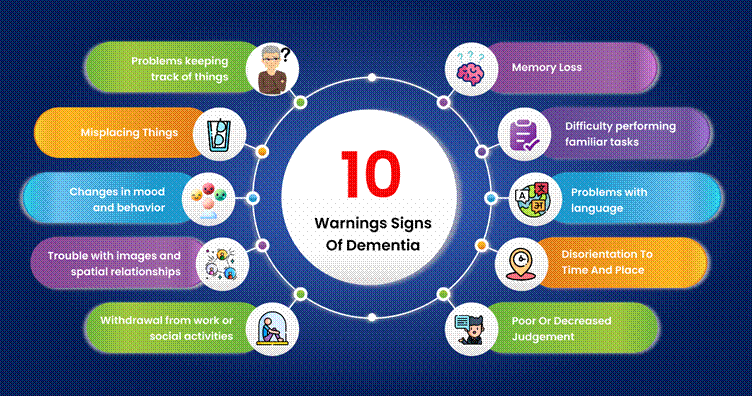
Alzheimer’s is a progressive neurodegenerative disorder that affects memory, cognition, and behaviour. One of the most dangerous symptoms as the disease progresses is wandering, which affects over 60% of individuals with dementia.
Early Signs of Alzheimer’s Disease
Symptom
Description
Memory loss
Forgetting recent events, names, or appointments repeatedly
Disorientation
Getting lost in familiar places or confused about time
Poor judgment
Making unsafe decisions, like dressing inappropriately for the weather
Mood changes
Sudden shifts in mood or personality, often appearing confused or anxious
Withdrawal
Avoiding social activities or work they once enjoyed
Recognizing these signs early can help families prepare for the risks, including the high probability of wandering behavior.
Why Do Seniors Wander?
Confusion about time or place
Looking for something or someone from the past
Restlessness or boredom
Stress in unfamiliar settings
Wandering is not just inconvenient—it’s dangerous. Seniors can become lost, dehydrated, or injured. Weather exposure, traffic hazards, and the risk of falling make this a critical issue.
Geo-fencing utilizes GPS or cellular data to establish virtual boundaries (“safe zones”) around a physical location. If the monitored person leaves that boundary, an instantalert is sent to caregivers via a mobile app or text.
How Geo-Fencing Helps
Feature
Benefit
Custom Safe Zones
Set areas like home, backyard, or familiar parks
Real-Time Alerts
Get notified immediately when the senior steps out
Location Tracking
Pinpoint the exact GPS location for faster retrieval
Activity History
See movement patterns that may indicate increased risk
Emergency Button
Some devices allow the senior to send alerts themselves
When integrated with wearable tech like GPS-enabled watches or smartphone apps, geo-fencing offers an invisible layer of safety.
In the U.S., more than 11 million people provide unpaid care for individuals with Alzheimer’s. The emotional and physical toll is overwhelming. Technology like geo-fencing can ease that burden.
Case Example:
Linda, a caregiver for her 78-year-old mother, received a geo-fence alert one morning while at work. Her mother had opened the front gate and started walking. Within minutes, Linda was able to guide a neighbor to her location using live GPS, preventing what could have been a tragic outcome.
With features like geofencing and location tracking, the mySeniorCareHub app offers the most user-friendly interface. The best part of this app is that it’s free for users.
It’s Time to Use Location Tracking
Even if your loved one hasn’t wandered yet, certain signs suggest it’s time to consider geo-fencing:
They get confused in familiar surroundings
They’ve left the house without informing anyone
You find them awake or active at odd hours
They ask about going “home” when they’re already home
They’ve had one or more near-miss incidents
Proactively using location tracking can prevent a tragedy rather than reacting to one.
Addressing Privacy and Dignity
One concern caregivers often express is, ‘Will tracking invade their dignity?’
Here’s how to approach it:
Frame it as protection, not surveillance
Choose discreet devices that feel less intrusive
Explain the reasoning behind it compassionately
Most seniors, especially those in early stages, are willing to agree when they understand it keeps them safe.
The hours we lost Grandma were filled with fear, guilt, and helplessness. Had we known about geofencing and tracking, it could have ended differently.
Technology won’t stop Alzheimer’s. But it can give families the tools to respond faster, safer, and with more peace of mind. If your loved one is showing early signs, or even if they aren’t, don’t wait for the moment they walk out unnoticed.
Set a digital safety net. One alert could make all the difference.
The “Silver Tsunami” is here, with 10,000 Americans turning 65 every day. For millions of families, the challenge is balancing a senior’s independence with their safety.
A GPS tracking app is a modern caregiver’s best tool. Rather than a “spy” device, it serves as a digital safety net, allowing aging parents to keep their freedom while giving families much-needed peace of mind.
Growing Need for Location Awareness
The statistics regarding senior safety in the U.S. are sobering. According to the Alzheimer’s Association,6 in 10 people living with dementia will wander at least once.
If not found within 24 hours, up to half of those who wander risk serious injury or death. Even for seniors without cognitive impairment, physical emergencies like falls, the leading cause of injury among older adults, can happen anywhere.
A GPS tracking app ensures that “anywhere” has a specific set of coordinates for emergency responders.
4 Reasons why a GPS Tracking App for Seniors is Essential
1. Rapid Response During Elopement
In the senior care industry, “elopement” refers to a senior wandering away from a safe environment. When a loved one goes missing, every minute counts.
A GPS app provides real-time location data, reducing search times from hours to mere minutes.
2. Geofencing: Virtual Safety Perimeter
Modern apps allow you to set Geofences– virtual boundaries around a home, a neighborhood, or a doctor’s office.
If your loved one crosses these boundaries, your phone receives an instant alert. This allows for “passive monitoring,” where you only intervene when a potential risk is detected.
3. Empowerment through Independence
Many seniors resist care because they fear losing their autonomy. A GPS tracking app is a compromise that works.
It allows a senior to walk to the local park or visit a friend without a chaperone, knowing that help is just a tap away if they become disoriented or fatigued.
4. Critical Support for “Long-Distance” Caregivers
With many adult children living in different states from their parents, physical check-ins aren’t always possible.
A tracking app bridges the geographical gap, allowing a daughter in New York to ensure her father in Florida returns home safely from his grocery shopping.
Key Features to Look For
When selecting a GPS tracking app for seniors, look for these industry-standard features:
Real-Time Updates: Location accuracy within a few yards.
Battery Efficiency: Apps that don’t drain the senior’s phone quickly.
SOS/Emergency Button: A simple interface for the senior to signal for help.
Location History: To identify patterns or frequent stops that might indicate a new routine or a problem.
How Technology Translates to Safety
A GPS tracking app for seniors isn’t just about dots on a map; it’s about replacing “What if?” with “I know.” Here is how the specific features of mySeniorCareHub solve the most common challenges in senior care:
Caregiver Challenge
App Features
Real-World Benefits
Wandering Risk
Smart Geofencing
You get an instant alert the moment they leave their “Safe Zone,” allowing you to intervene before they get lost.
Golden Hour
One-Touch SOS
In a fall or medical emergency, the senior can alert the entire family in seconds; no dialing required.
Coordination Fatigue
Multi-User Sync
No more “Who checked on Mom?” phone calls. The whole family sees the same real-time status updates.
Battery Anxiety
Low-Power Tracking
The app is optimized to stay active without draining the phone, ensuring the safety net is always “ON.”
Memory Gaps
Location History
Identify unusual patterns, like a senior visiting the pharmacy three times in one day, which may signal cognitive decline.
Secure Your Peace of Mind with mySeniorCareHub
If you are looking for a reliable, user-friendly solution designed specifically for the needs of American families, look no further than mySeniorCareHub.
Our GPS Tracking App for Seniors & Aging Parents provides the perfect balance of independence for them and intelligence for you. From customizable safe zones to instant emergency notifications, we ensure that your loved ones are never truly alone, even when they are out exploring.
Don’t wait for a “what if” scenario to become a reality. Protect your loved one’s independence and your own peace of mind today.
Frequently Asked Questions: GPS Tracking App for Seniors
How do I introduce a GPS tracking app without making my parents feel “monitored”?
The key is framing. Instead of “tracking” or “surveillance,” present the mySeniorCareHub app as a “Digital Safety Net.” Focus on the benefit to you; explain that having the app on their phone reduces your anxiety and allows you to support their independence longer.
Many seniors are happy to use the technology once they realize it provides a direct SOS link to their family in case of a fall or disorientation.
Is a smartphone app better than a dedicated GPS wearable device?
For most active seniors, yes. Wearable smartwatches or lockets can carry a social stigma that leads to seniors “forgetting” to wear them. However, most American seniors already carry a smartphone to stay in touch with grandkids or use maps.
By using a GPS tracking app for seniors, you utilize a device they already carry, ensuring higher compliance and providing better location accuracy through a mix of GPS, Wi-Fi, and cellular data.
Can a GPS app actually help if my loved one has “Sundowning” symptoms?
Absolutely. “Sun-downing”- a state of confusion that hits late in the afternoon is a primary cause of wandering in those with early-stage dementia. Unlike static alarms, a GPS app with Geofencing acts as an early warning system.
It alerts you the moment they cross a digital boundary during these high-risk hours, providing the “Real-Time Intelligence” needed to reach them before they become truly lost or reach a high-traffic roadway.